
Backtestle vs TradingView Bar Replay
By Backtestle · Last updated:
Competitor details come from their own pages, with a source link on every row · Prices may change
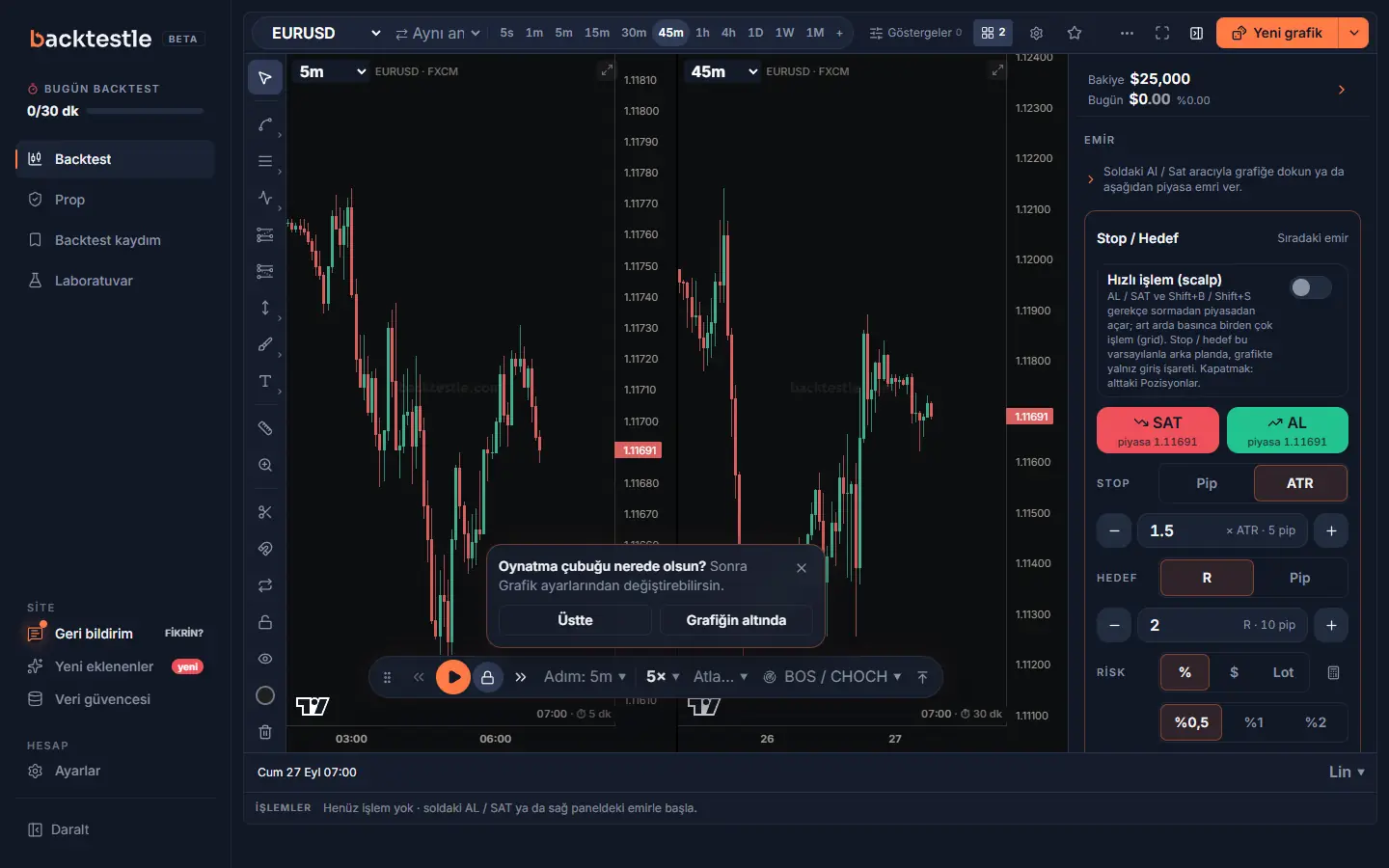
Short answer: TradingView Bar Replay is the natural choice for traders who already analyze on TradingView and want Pine / 400+ indicators with millions of instruments on the same chart; Backtestle is a replay-focused tool in Turkish, free during beta: intraday replay needs no paid plan, trades are saved to a log, and prop rules for 33 firms / 160 programs are built in.
Bar Replay is a feature inside the TradingView chart: you start from a past point on the chart and play price candle by candle. A separate 'Replay Trading' mode lets you place orders during replay. Backtestle is a separate site made only for replay backtesting and prop practice; the two don't replace each other and are often used together.
Backtestle vs TradingView Bar Replay: feature comparison
| Feature | Backtestle | TradingView Bar Replay |
|---|---|---|
| Price | Free during beta: sign up with your email. | The Basic plan is free. Per month, billed yearly: Essential $12.95, Plus $29.95, Premium $59.95, Ultimate $199.95 (labeled 'special price'). Sales tax may apply by region.Last checked: · tradingview.com/pricing ↗ |
| Plan limits on replay | No paid tiers; 1-minute and 5-second data included. Limits: up to 3 free-form profiles, and AI trade reviews are limited per day. Intraday replay (EURUSD, GBPUSD, XAUUSD, BTCUSDT, ETHUSDT, USDJPY, NAS100) and 5-sec (EURUSD, XAUUSD, NAS100, BTCUSDT) free during beta. | Bar Replay on daily and higher timeframes on all plans. No intraday history on Basic; 180 days on Essential, 365 days on Plus, full history on Premium and Ultimate. Second data from Premium, tick data on Ultimate (7 days).Last checked: · tradingview.com/pricing ↗ |
| Interface language | Turkish interface; times shown in Turkey time (UTC+3). Guides, glossary and prop rules pages are in Turkish. | Turkish interface available (tr.tradingview.com).Last checked: · tr.tradingview.com ↗ |
| Symbols and markets | 189 trading symbols: 62 forex pairs, 7 indices, gold, silver, 2 oil contracts, BTC and ETH. No stocks, ETFs, futures or bonds. | The pricing page says access to 3,539,722 instruments (stocks, forex, crypto, futures, indices and more). Replay depth varies by symbol and timeframe.Last checked: · tradingview.com/pricing ↗ |
| Data depth | Forex history goes back to 2012; coverage varies by symbol. Indices / commodities start around 2014–2016, crypto from its listing month. Base resolution 5 min; 1 min only for EURUSD, GBPUSD, XAUUSD, BTCUSDT, ETHUSDT, USDJPY, NAS100, 5 sec only for EURUSD, XAUUSD, NAS100, BTCUSDT. Source and coverage per symbol on the /veri page; 96 symbols compared against TradingView. | On some symbols 1-minute data goes back to 2000 ('20+ years of intraday replay'); all second data starts in August 2022. Depth varies by symbol and plan.Last checked: · tradingview.com/support/solutions/43000712747-bar-replay-how-and-why-to-test-a-strategy-in-the-past ↗ |
| Trading in replay and costs | Market / limit / stop orders, stop loss, scaled take profit, partial close, lot and margin calculation. Spread (optional variable spread), commission, manual slippage and swap on prop accounts are included; there's a high-impact USD / EUR / GBP news layer. Trades are saved to the log with a chart screenshot. | 'Replay Trading' is a separate mode: market / limit / stop / stop-limit orders; starting capital, currency and commission can be set. Results are visible only in that session and aren't stored anywhere (Performance and the trade list can be exported). Spread and swap aren't mentioned on the help page.Last checked: · tradingview.com/support/solutions/43000691889-learn-to-trade-on-historical-data ↗ |
| Prop firm simulator | 33 firms / 160 programs built in; rules are compiled from the firms' public pages, and every program has an official source link and check date. Daily loss, max loss (static / trailing / end-of-day), target, minimum days and consistency; news window (107 programs), weekend (35) and max lot size (17) included. An order that would break a rule gets a warning before it's placed; if you hit a limit the account fails and a "why did I fail" post-mortem is shown. | The pricing and Bar Replay help pages don't include a prop firm challenge simulator.Last checked: · tradingview.com/pricing ↗ |
| Indicators and custom code | Built-in indicators (moving averages, RSI, MACD, Ichimoku, Supertrend, volume and more) and ICT / SMC layers (FVG, killzones, HTF bias, Power of 3, Asian range). No custom indicator code / Pine. | 400+ built-in indicators, 100,000+ community indicators, 110+ drawing tools, custom indicators and strategies with Pine Script. Indicators per chart by plan: 2 / 5 / 10 / 25 / 50.Last checked: · tradingview.com/pricing ↗ |
| Multiple charts | Multi-chart layouts on the backtest screen (2 / 3 / 4 / 6 / 8 grid). | 1 (Basic), 2, 4, 8 or 16 charts per tab; replay can run in sync on all charts.Last checked: · tradingview.com/pricing ↗ |
| Analysis | Stats (win rate, average R, drawdown, Monte Carlo), a strategy scorecard with confidence intervals based on trade count, prop pass probability from your own R distribution, bulk exit optimization; upload an MT4 / MT5 history file and compare it with your backtest. | Strategy backtesting and 'Deep backtesting' are listed as separate features in the pricing table (with Pine). Replay Trading results aren't stored outside the session (see 'Trading in replay and costs').Last checked: · tradingview.com/pricing ↗ |
| Platform | Runs in the browser, mobile-first interface (can be added to the home screen). No native app store app. | Web, desktop and mobile apps.Last checked: · tradingview.com/pricing ↗ |
Where is TradingView Bar Replay stronger?
- Indicator ecosystem: 400+ built-in, 100,000+ community indicators and Pine Script.
- Millions of instruments in one place; live charts, alerts and replay in the same interface.
- Synchronized replay across multiple charts; second replay from Premium, tick replay on Ultimate.
- Turkish interface and a very large user base (100 million traders on the pricing page; self-reported).
- Replay can be tried on daily and higher timeframes with the free Basic plan.
Where is Backtestle stronger?
- Intraday replay needs no paid plan; EURUSD, GBPUSD, XAUUSD, BTCUSDT, ETHUSDT, USDJPY, NAS100 at 1 minute, EURUSD, XAUUSD, NAS100, BTCUSDT at 5 seconds.
- Replay trades are kept: automatic chart screenshots, R / $ stats, Monte Carlo, strategy scorecard.
- Built-in prop rules: 33 firms / 160 programs, pre-order warnings and post-mortem.
- Competitions, blind scenarios and historical shock scenarios.
Our numbers are generated from the site's own data: see the prop firm rules, data quality and glossary pages for details.
Which one should you choose?
Choose TradingView Bar Replay if:
- You already work with TradingView indicators and drawings, or you use Pine Script.
- You need a wide range of instruments such as stocks, futures and foreign exchanges, and second / tick replay.
- You want to replay on the same screen as your live analysis.
Choose Backtestle if:
- You want your replay results to turn into a lasting log and stats.
- You don't want to move to a paid plan for intraday replay.
- You want to practice with prop rules before a challenge.
You can also use both: for most traders these tools don't replace each other, they complement each other for different jobs.
Try Backtestle yourself
Free during beta: sign up with your email, trade available historical data with replay and try prop firm rules.
Frequently asked questions
Is TradingView Bar Replay free?
Partly. On TradingView's free Basic plan, Bar Replay works on daily and higher timeframes; intraday replay needs a paid plan (180 days on Essential, 365 days on Plus, full history on Premium and Ultimate). Prices and features were checked on the competitor's own page on October 13, 2026; they may change, so check the competitor's current page before you buy.
How do you use TradingView Bar Replay on a free account?
Set the chart to a daily or higher timeframe. Press the 'Bar Replay' button with the rewind icon on the top panel. Pick the starting bar on the chart; 'Select date' or 'Random bar' also work. Then press 'Play', adjust the speed, or step forward bar by bar. On the keyboard, Shift + ↓ plays / pauses and Shift + → steps forward. (TradingView Bar Replay help page, checked on October 28, 2026.)
What are the limits of TradingView Bar Replay on a free account?
On the Basic plan, replay works only on daily and higher timeframes; there's no intraday history. You get 2 indicators per chart and 1 chart per tab. According to the help page, you can't create server-side alerts during replay. Some chart types such as Renko, Kagi and Range don't work in replay. Replay Trading results aren't stored outside the session. Lower timeframes need a paid plan (180 days on Essential, 365 days on Plus). Prices and features were checked on the competitor's own page on October 13, 2026; they may change, so check the competitor's current page before you buy.
Are trades saved in TradingView replay?
According to the TradingView help page, in 'Replay Trading' mode the trade data and overall result are visible only in that session and aren't stored anywhere; Performance and the trade list can be exported. In Backtestle every trade is saved to the log with a chart screenshot.
Does TradingView have a prop firm simulator?
TradingView's pricing and Bar Replay help pages (October 13, 2026) don't include a prop firm challenge simulator. Backtestle includes 160 programs from 33 firms as built-in rules.
Can Backtestle replace TradingView replay?
For replay backtesting, a lasting trade log and prop practice, yes; if you need Pine Script, 400+ indicators and a wide instrument range, it makes sense to stay on TradingView or use both together.
Sources
- TradingView pricingLast checked: · tradingview.com/pricing ↗
- TradingView Bar Replay help pageLast checked: · tradingview.com/support/solutions/43000712747-bar-replay-how-and-why-to-test-a-strategy-in-the-past ↗
- TradingView: trading in replay (Replay Trading)Last checked: · tradingview.com/support/solutions/43000691889-learn-to-trade-on-historical-data ↗
- TradingView: Bar Replay data depthLast checked: · tradingview.com/support/solutions/43000692816-how-much-data-is-available-for-bar-replay ↗
- TradingView Turkish interfaceLast checked: · tr.tradingview.com ↗
Other comparisons
Backtestle wrote this page, so it's a biased source. That's why every competitor detail links to its source and shows the last checked date. We also describe where each competitor is stronger. Competitor details were taken from their own pages on October 13, 2026. Prices and features may change, so check the competitor's current page before you decide. If something is wrong or outdated, tell us on the feedback page (login required). We'll fix it with the source.
Product names and brands mentioned belong to their owners; they're named only for comparison. Backtestle is not affiliated with these companies. Backtestle is an education and backtesting tool; it doesn't give investment advice and isn't a broker. No real money is traded. Prop firm rules may change, and past results don't guarantee future returns.